
Azure Event Grid events for completed uploads
Many pipelines react to files arriving in Azure Storage by subscribing to
the Microsoft.Storage.BlobCreated event - directly through an Event Grid
subscription, or indirectly through Azure Data Factory storage event
triggers, Databricks Auto Loader in file notification mode, or Snowflake
Snowpipe auto-ingest. Which events your account emits, and when, depends on
whether the storage account has hierarchical namespace (Data Lake
Storage Gen2) enabled.
This guide explains what fires when your Simple FTP Service writes a file to your Azure backend, and how to make sure downstream automation runs only once the upload is complete - not when a zero-byte file first appears.
Which backend does your service use?
Sign in to the DocEvent console and open Simple FTP Service → Your Services. The Storage type column shows which Azure backend each service writes through:
azure/blob- a storage account with a flat namespace (regular Blob Storage)azure/datalake- a storage account with hierarchical namespace enabled (Data Lake Storage Gen2)
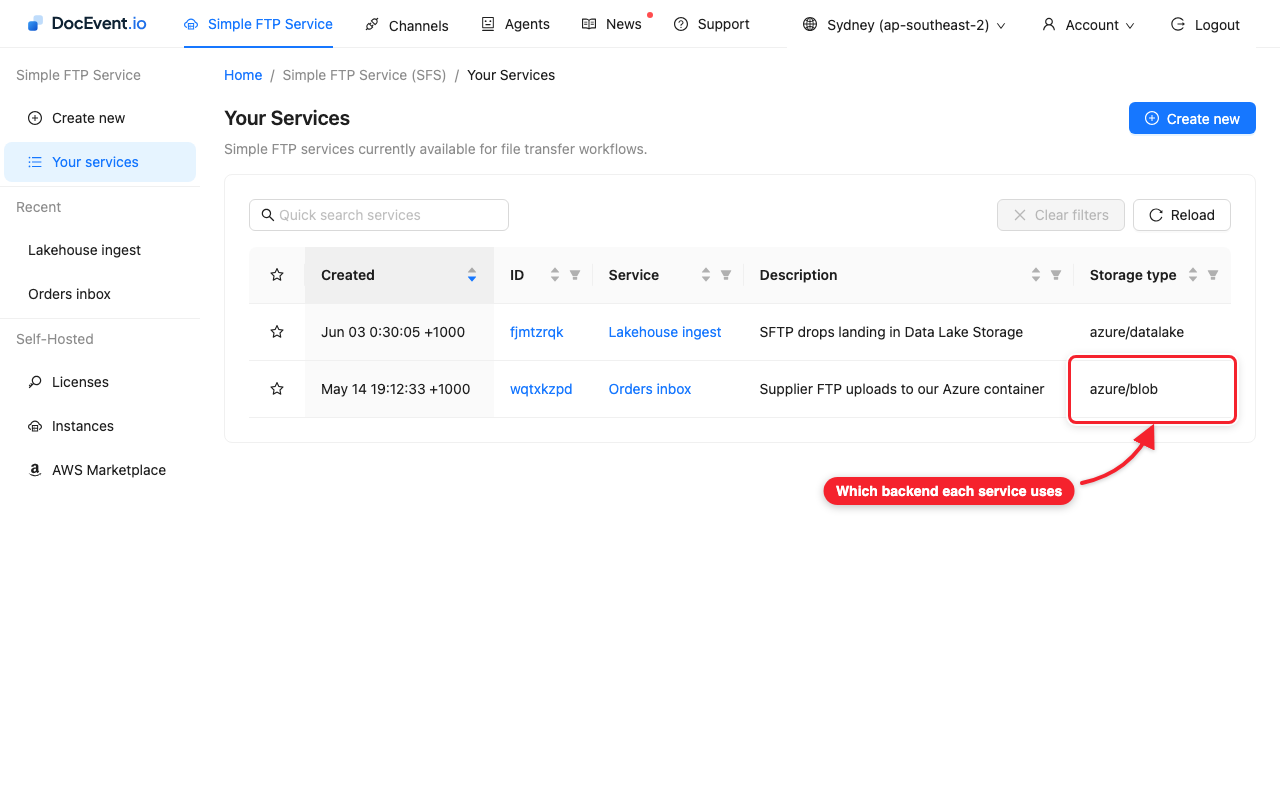
You always select "Azure Blob Storage" when creating a service - DocEvent
detects hierarchical namespace automatically and stores through the right
API for the account, which is why a service can show azure/datalake even
though you picked Blob.
Flat namespace accounts (azure/blob) - one event per upload
On a storage account without hierarchical namespace - storage type
azure/blob - SFS uploads through
the Blob API and commits the file with a single block-list commit. Azure
emits one BlobCreated event, at commit time, with data.api set to
PutBlockList. When you receive it, the file is complete - there is
nothing to filter.
(Other tools writing to the same container may produce PutBlob for small
files or CopyBlob for server-side copies - the
event schema reference
lists the possible data.api values.)
Data Lake Storage Gen2 accounts (azure/datalake) - two events per upload
On an account with hierarchical namespace enabled - storage type
azure/datalake - SFS automatically uses
the Data Lake (DFS) API. A Data Lake upload happens in stages: the file is
created, data is appended, and the file is finally flushed with close to
mark it complete. Azure Event Grid only announces two of those stages -
CreateFile and FlushWithClose -
so one completed upload produces two BlobCreated events:
data.api: "CreateFile"- the file now exists in the namespace, with zero bytes of contentdata.api: "FlushWithClose"- the upload is complete and the content is final
The CreateFile event cannot be suppressed - file creation is a namespace
operation on Data Lake Storage, and Azure always announces it. This
two-event pattern is not specific to DocEvent: it is what every
well-behaved Data Lake writer produces, including the Spark/Hadoop ABFS
driver used by Databricks, Synapse and Fabric.
Act only on FlushWithClose
If your subscriber must only see completed files, filter on data.api.
This is Microsoft's own recommendation, and the managed integrations
already follow it: Data Factory storage event triggers, Auto Loader file
notification mode and Snowpipe auto-ingest all ignore CreateFile and act
on FlushWithClose.
For your own Event Grid subscription, add an advanced filter on
data.api. Including the Blob API commit values as well makes one filter
correct for both account kinds - and for files written to the same
container by blob-endpoint tools such as azcopy, the Azure portal or
Storage Explorer:
"advancedFilters": [
  {
    "operatorType": "StringIn",
    "key": "data.api",
    "values": ["FlushWithClose", "PutBlockList", "PutBlob"]
  }
]
With this filter in place, every event you receive represents a file whose content is complete.
If files never trigger downstream processing
A writer that flushes a Data Lake file without the close flag produces
no FlushWithClose event at all - Azure does not emit an event for a
plain flush, so the only BlobCreated such an upload ever produces is the
zero-byte CreateFile. Unfiltered subscribers fire while the file is
still empty, and consumers that (correctly) filter on FlushWithClose
never fire.
This missing-close trap is common across the ecosystem, so if a writer in
your pipeline produces files that never trigger downstream processing,
check whether it flushes with close. Microsoft's own Data Lake
SDK convenience upload
defaults Close to false,
the same pattern exists in several Apache NiFi and Kafka Connect sinks, and
Databricks documents
Auto Loader not picking up files written by an Azure Function
for exactly this reason. The
Path - Update API reference
describes the flush close parameter and the event it controls.