
Receive channel files from an S3 bucket
The Amazon S3 source plugin (recv-s3-v1) feeds a channel from an S3
bucket in your own AWS account: whenever a new file lands in the bucket, S3
notifies DocEvent through an SNS topic and the file enters your channel for
routing.
Three things must be true in your AWS account:
- Your bucket publishes new object notifications to an SNS topic you own
- That topic lets DocEvent's AWS accounts subscribe to it
- Your bucket lets DocEvent read the files (read-only)
You can set all of that up with one click - or by hand, if you want to control every detail.
The automatic way (recommended)
When adding the source in the console (channel page → Add source → Amazon S3), use the Launch Stack button on the form. It opens AWS CloudFormation in your account, pre-filled with our template, and works with either a new bucket or an existing bucket - you choose during setup.
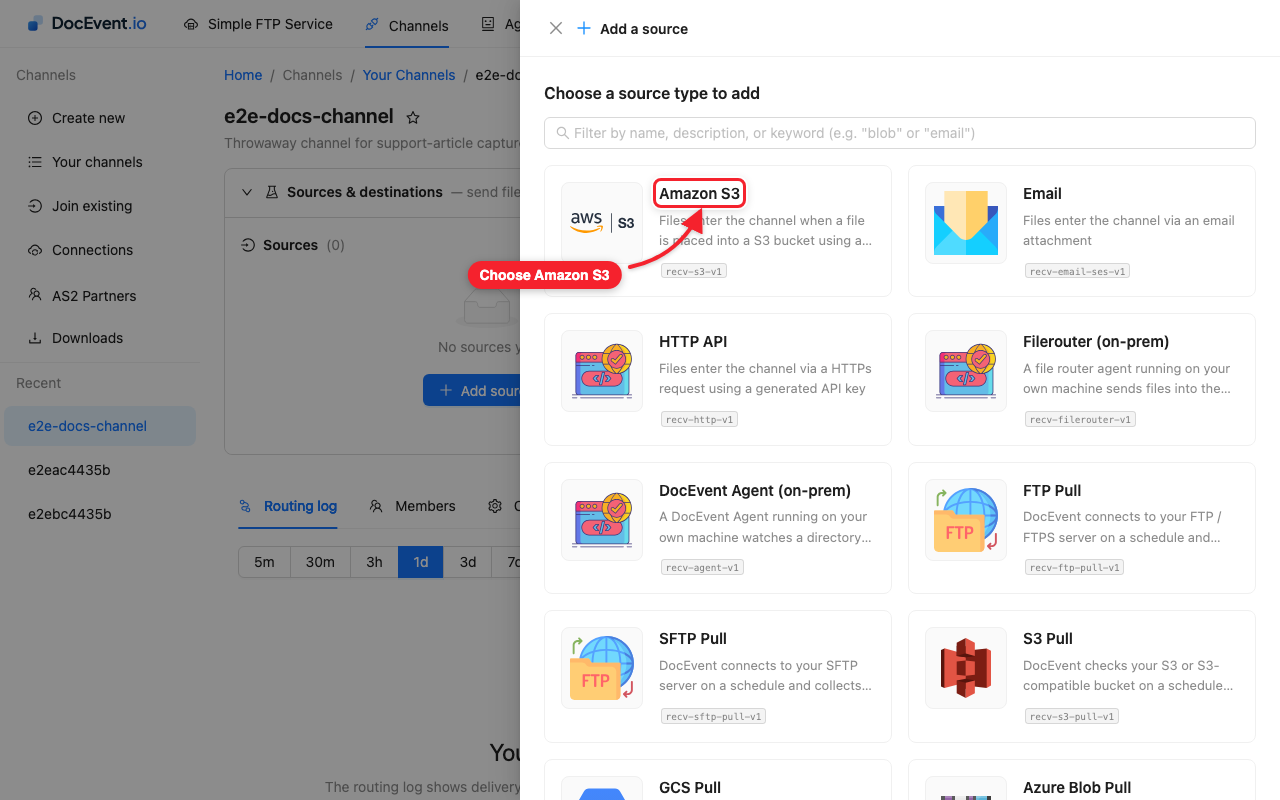
The stack creates the topic and permissions, wires the bucket notification (preserving any notifications the bucket already had), and its Outputs tab hands you the two values the form needs: BucketName and TopicArn.
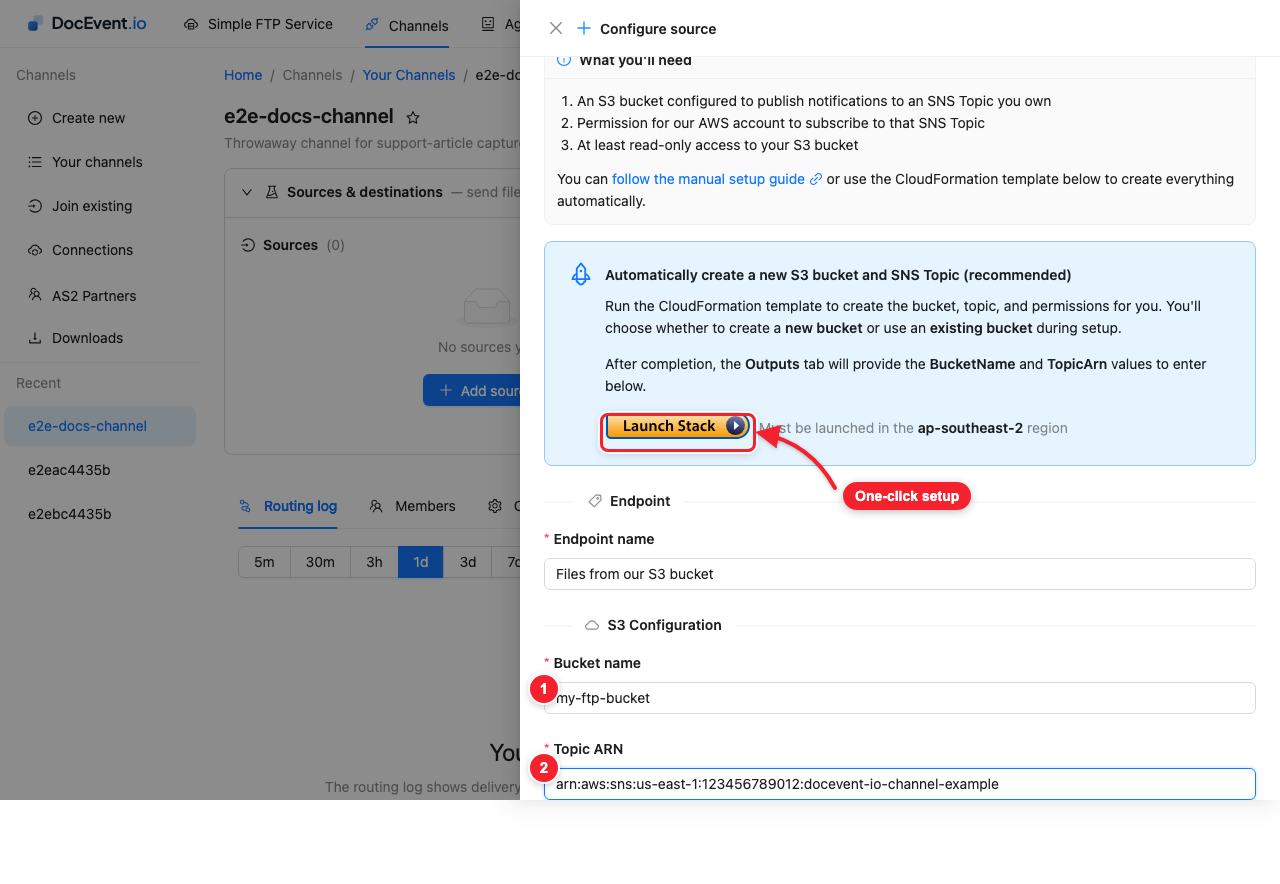
Enter those two values, name the endpoint, and add it. Optionally, filter what enters the channel:
- Path filter(s) - only pick up keys matching the given path prefixes
- Mimetype filter(s) - only pick up matching content types
The manual way
If you prefer to create things yourself, replicate what the stack does:
1. Allow DocEvent to read your bucket
Attach this bucket policy (replace YOUR-BUCKET-NAME). The two principals
are DocEvent's AWS accounts:
{
  "Version": "2012-10-17",
  "Id": "ReadOnlyAccessPolicy",
  "Statement": [
    {
      "Sid": "AllowReadOnlyAccess1",
      "Effect": "Allow",
      "Principal": { "AWS": "841260601650" },
      "Action": "s3:GetObject",
      "Resource": "arn:aws:s3:::YOUR-BUCKET-NAME/*"
    },
    {
      "Sid": "AllowReadOnlyAccess2",
      "Effect": "Allow",
      "Principal": { "AWS": "951067121082" },
      "Action": "s3:GetObject",
      "Resource": "arn:aws:s3:::YOUR-BUCKET-NAME/*"
    }
  ]
}
This is an explicit grant to two specific accounts - your bucket stays private and Block Public Access can stay on.
2. Create the SNS topic
Create the topic in the same region as your channel, and mind two requirements the plugin enforces:
- The topic name must start with
docevent-io-channel-- DocEvent only subscribes to topics with that prefix. - Signature version must be 2 (SHA-256). SNS defaults to the SHA-1
signature version 1, which DocEvent rejects as insecure - set
SignatureVersion: 2on the topic.
3. Let the bucket publish, and DocEvent subscribe
Attach this access policy to the topic (replace YOUR-BUCKET-NAME and
YOUR-TOPIC-ARN):
{
  "Version": "2012-10-17",
  "Id": "TopicPolicy",
  "Statement": [
    {
      "Sid": "AllowBucketPublish",
      "Effect": "Allow",
      "Principal": { "AWS": "*" },
      "Action": "sns:Publish",
      "Resource": "YOUR-TOPIC-ARN",
      "Condition": {
        "ArnLike": { "aws:SourceArn": "arn:aws:s3:::YOUR-BUCKET-NAME" }
      }
    },
    {
      "Sid": "AllowDocEventSubscribe1",
      "Effect": "Allow",
      "Principal": { "AWS": "841260601650" },
      "Action": "sns:Subscribe",
      "Resource": "YOUR-TOPIC-ARN"
    },
    {
      "Sid": "AllowDocEventSubscribe2",
      "Effect": "Allow",
      "Principal": { "AWS": "951067121082" },
      "Action": "sns:Subscribe",
      "Resource": "YOUR-TOPIC-ARN"
    }
  ]
}
4. Notify the topic on new objects
On the bucket, add an event notification for s3:ObjectCreated:* events
with the SNS topic as the destination.
5. Create the source in DocEvent
Back in the console, add the Amazon S3 source to your channel and enter your bucket name and topic ARN.
How files flow afterwards
Each new object in the bucket triggers a notification; DocEvent reads the object (read-only - it never modifies or deletes anything in your account) and routes it to the channel's destinations. Deliveries and any failures appear in the channel's routing log.